Apple Keynote As a Design Tool
As a designer, getting new tools is second only to the love of creating something delightful for your audience. Recently, I’ve added a new tool to my arsenal, Apple’s presentation software, Keynote. There’s been quite a few people who have made the same realization, which is this: it’s a powerful tool for wireframing and creating digital assets. Let me show you some examples of where I’ve recently applied this tool.
Wireframing
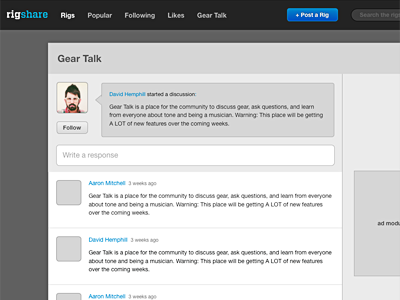
For low-fidelity wireframes, Keynote excels with its powerful shapes, vector tools, smart guides, master layouts, and pixel-level precision. I applied this on a recent wireframe I did for RigShare (link), the social guitar gear sharing site I’ve been building in my free time. I wanted to redesign our “Gear Talk” area, a place where musicians could ask questions, discuss gear, and generally just shoot the shoot. With Keynote, I was able to whip up a decent looking mockup rather quickly.
Hi-fidelity Comps
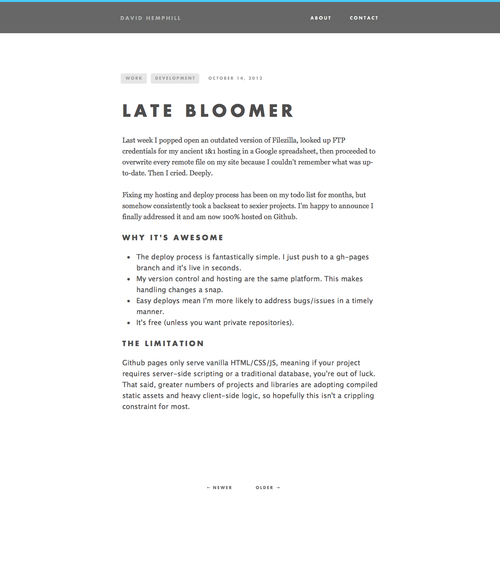
The most-recent, stripped down version of this site was comped entirely in Keynote. Granted, the design is not overly complex and any junior-level developer could code it out, but Keynote’s ease of use makes it a perfect candidate for this type of design work. Using Photoshop to mock up such a site would have taken me much longer, with the added danger of causing me to lose interest in the project.
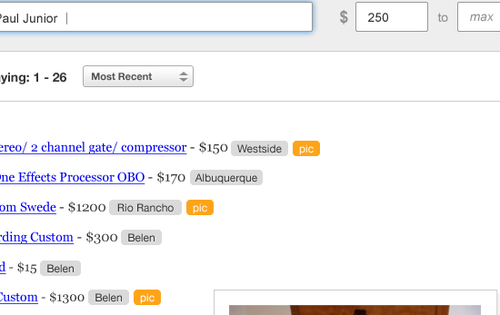
Another project’s design required me to make many new tag-like buttons, and I was able to use Keynote’s shape tools to create the right look and feel and paste them directly into Photoshop as vector smart objects. What a beautiful thing.
Simple Logos and Diagrams

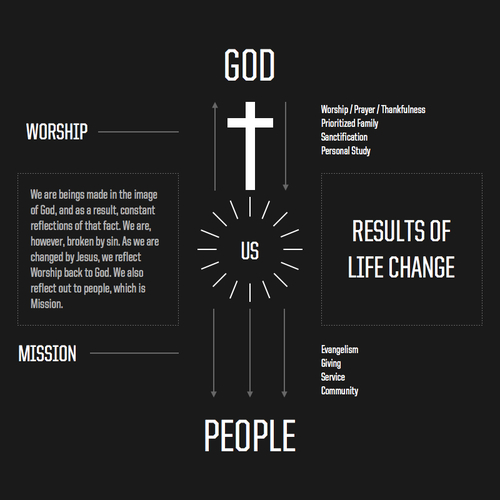
I was goofing around the other day, and wound up designing a logo for my band, Avapor, and used it to throw together imaginary album artwork. I also created a simple infographic. I was able to export both of these items as pdfs, which could then be inserted into Photoshop documents, edited with Illustrator, or mailed as-is.
Final Thoughts
There are a number of tools designers can use these days to get work done. Photoshop, Illustrator, Fireworks, etc… and even some new ones like Sketch that I’d like to try out. Whatever you use, it comes down to picking tools that help you get work done in the most creative, time-efficient manner and I’ve found Keynote to be a great asset in my production tool belt. Why not give it a try?