Apple Keynote As a Design Tool
As a designer, getting new tools is second only to the love of creating something delightful for your audience. Recently, I’ve added a new tool to my arsenal, Apple’s presentation software, Keynote. There’s been quite a few people who have made the same realization, which is this: it’s a powerful tool for wireframing and creating digital assets. Let me show you some examples of where I’ve recently applied this tool.
Wireframing
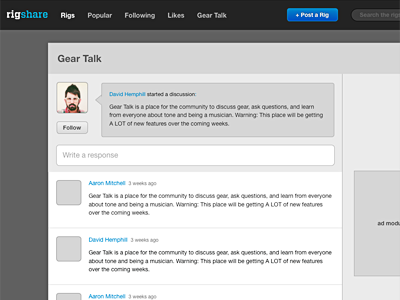
For low-fidelity wireframes, Keynote excels with its powerful shapes, vector tools, smart guides, master layouts, and pixel-level precision. I applied this on a recent wireframe I did for RigShare (link), the social guitar gear sharing site I’ve been building in my free time. I wanted to redesign our “Gear Talk” area, a place where musicians could ask questions, discuss gear, and generally just shoot the shoot. With Keynote, I was able to whip up a decent looking mockup rather quickly.
Hi-fidelity Comps
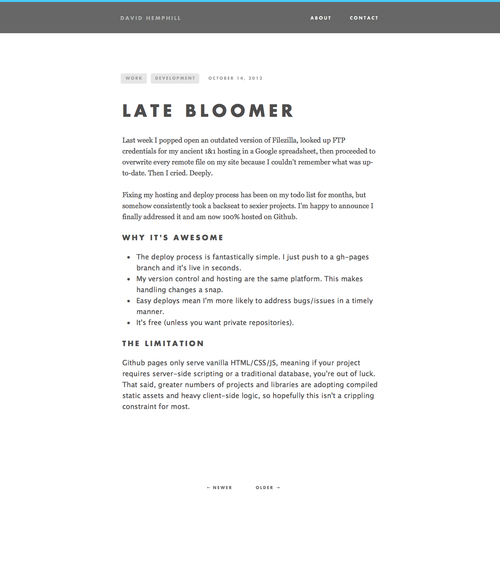
The most-recent, stripped down version of this site was comped entirely in Keynote. Granted, the design is not overly complex and any junior-level developer could code it out, but Keynote’s ease of use makes it a perfect candidate for this type of design work. Using Photoshop to mock up such a site would have taken me much longer, with the added danger of causing me to lose interest in the project.
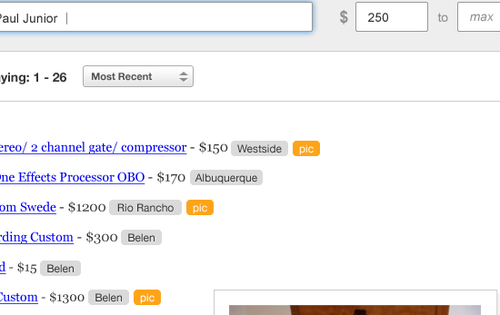
Another project’s design required me to make many new tag-like buttons, and I was able to use Keynote’s shape tools to create the right look and feel and paste them directly into Photoshop as vector smart objects. What a beautiful thing.
Simple Logos and Diagrams

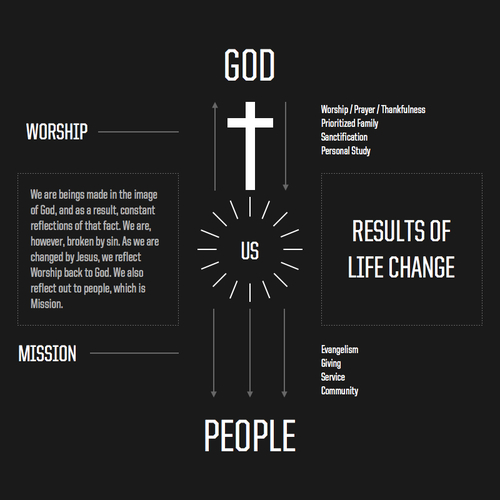
I was goofing around the other day, and wound up designing a logo for my band, Avapor, and used it to throw together imaginary album artwork. I also created a simple infographic. I was able to export both of these items as pdfs, which could then be inserted into Photoshop documents, edited with Illustrator, or mailed as-is.
Final Thoughts
There are a number of tools designers can use these days to get work done. Photoshop, Illustrator, Fireworks, etc… and even some new ones like Sketch that I’d like to try out. Whatever you use, it comes down to picking tools that help you get work done in the most creative, time-efficient manner and I’ve found Keynote to be a great asset in my production tool belt. Why not give it a try?
A Design Dillema
My recent tenure at Church Media Group has me in a dilemma between solving a user-experience problem and monotony on the web. You see, in the niche we fill at Church Media, there are a number of “standard” features and modules that most of our websites get. This includes things like audio and video pages, events, contact forms, etc… For all of these, we’ve built a default look and feel that solves the problem in the way Church Media would do it. They’re easy to implement because the back-end and front-end is already done, and it’s usually just a matter of changing colors and widths to get a module ready for launch.
One of the things we pride ourselves on our package websites is every site gets a completely custom homepage. You could look at our portfolio and debate with me how “custom” they look, based on the frequency and familiarity of the elements used, but I can assure you as one of the designers, these homepages are custom. And the fact that you would even debate with me the authenticity of our claim that our designs are bespoke and unique is an indication of a problem.
Take, for instance, an events module. This has been one of the things the design team has been talking about lately, so I think it fits well within this discussion. We have a standard, tabular look to our events listings that is our goto layout for these sections. The problem is, we don’t really feel like we’re solving any new problems or branching out and trying new things with them. I recently tried to rectify this and designed an events listing that scrolled using the jQuery cycle plugin. This was fresh to us. Often, we’ve been content to just stick with what we know works and not try anything new. But what could you try that is new? There’s not too many ways you could design a listing, constrained also by outside factors such as budget, timeline, and other constraints, so we usually just rest on our laurels and do what we’ve done before. I feel like we could do better, but I’m not sure how yet.